0330 165 6828

System Updates & Enhancements

Keep up with the latest system improvements, feature releases, and performance enhancements designed to make your operations more efficient.

Have an Idea or Suggestion?

Submit a Feature Request or Improvement

Rota Management Tools & Scheduling Enhancements

New Feature

Scheduling · December  2025

I am delighted to announce a powerful new feature now available in your Synergy Business Solutions platform: the Survey System.

New Rota Management Tools
  • Carry Forward Open Shifts: When you prepare a new schedule, the rota will now automatically carry forward any open shifts from the previous week, displaying them as unassigned slots ready to be filled.
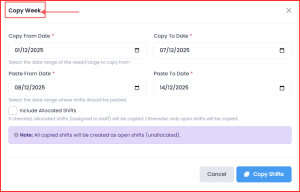
  • Copy Week Functionality: The Copy Week feature now allows you to copy and paste not only the complete rota but also the open shifts into the following week. [Please refer to the images below for a visual guide.]
     

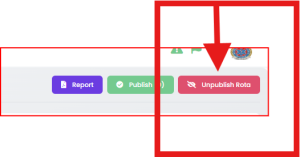
Unpublish Function: We’ve introduced an Unpublish button. If you’ve published the schedule and need to make amendments, clicking this button will immediately hide all shifts from your team members, allowing you to make confidential changes before re-publishing.
 
Schedule Customisation & Budget Monitoring
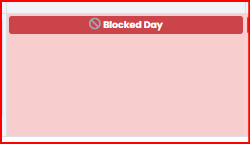
  • Block Non-Working Days: You can now block specific days from the rota for part-time workers, preventing shifts from being accidentally allocated on their non-working days.
    • To Block: Right-click on the day, then select Add > Block Day. You can block for the month or for the entire year.
To Unblock: Click on the red blocked box and select Unblock for the month or year.
 
  • Daily Budget Monitoring: You can now set a budget per day to monitor your rota costs. The system will calculate the actual daily cost, and if the cost exceeds your set budget, it will display in RED (and GREEN if under budget).

  • Save Weekly Shift Templates: Create all your standard weekly shifts and save them as a template. These will be stored in your open shifts, making it significantly quicker to copy and paste them into the following week’s rota for easy allocation to your team.
Alert History
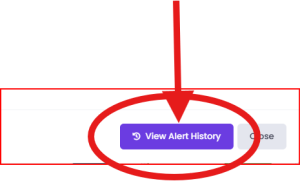
  • View Alert History: You can now view a complete history of all system alerts from a dedicated View Alert History section.
 

All Updates

Custom Forms Categorisation

Forms & Audits

November 2025

We’re excited to share a new enhancement to your system that makes managing Custom Forms even easier.

You can now categorise your Custom Forms using custom tags or labels, allowing for faster searching, better organisation, and improved workflow efficiency. 

Whether you’re sorting by department, project type, or any other criteria, this new feature helps you find what you need—when you need it.

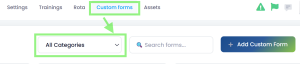
To start using this feature, simply navigate to your Custom Forms section and select “All Categories” to assign relevant tags.

Custom Forms > All Categories – when selected the system will search for related Audits / Forms:

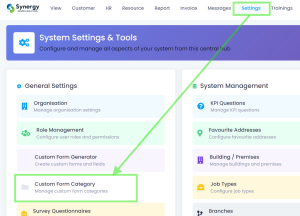
To add different categories go to: Settings > General Settings > Custom Form Category

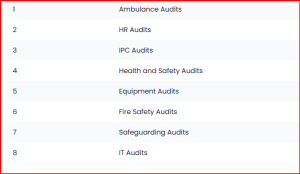
To get you started, we have provided some categories:

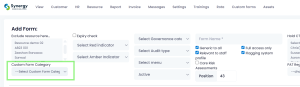
Finally, to allocate a custom form to the desired category, go to: Custom Forms – here you will see the Category selection box:

As always, our team is here to support you. If you have any questions or need assistance, feel free to reach out.
Read More Collapse

Smart Keyword Search for Bookings

Bookings

November 2025

We’re pleased to share a new enhancement to our booking system, designed to make your scheduling process even more efficient.

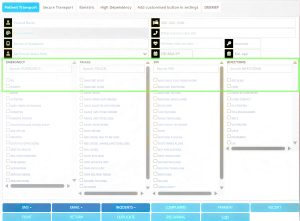
Our latest update introduces a smart keyword search filter within the booking interface. This intuitive feature allows you to simply start typing a keyword — whether it’s a specific risk, piece of equipment, or patient requirement — and the system will instantly begin filtering across all criteria.
 
What this means for your team:
 
  • Faster access to the right information
  • Easier identification / allocation of patient-specific needs
  • Streamlined booking workflows with fewer clicks and less scrolling to search
This is part of our ongoing commitment to improving our systems for the benefit of both our valued clients and in turn your service-users. We’re always looking for ways to enhance usability, reduce admin time, and support your teams in delivering outstanding care.
 
Read More Collapse

Multi Clock-In & Out Feature

Rota & Attendance

October 2025

In response to a client request, we are pleased to announce an exciting new enhancement to our rota system that will simplify the way you manage staff shifts.

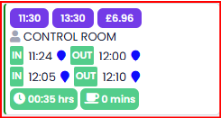
Our system now supports multiple clocking in and out within the same shift.
 
This new feature automatically calculates and summarises the total hours worked, break times, and the cost of the shift, providing you with a complete overview.
 
Here is an example of how the new feature works, and appears:
This enhancement is particularly useful for organisations that use bank staff or employ staff who are paid per job. It provides clear and accurate data for shifts that involve multiple periods of work, such as a temporary worker covering different shifts or multiple tasks in one day.
 
We believe this will make managing your rotas more efficient and transparent.
 
If you have any questions, please reach out – and as always, please keep the feedback and requests coming in, we thank you for your continued support in the evolution of Synergy Business Solutions.
Read More Collapse

New Survey System

Surveys & Feedback

October 2025

I am delighted to announce a powerful new feature now available in your Synergy Business Solutions platform: the Survey System.

This new tool is designed to help you gather vital feedback that can transform your organisation’s culture, leadership, and staff wellbeing. Collecting feedback is critical for evaluating areas that matter most to regulators like the CQC, including:
  • Workplace culture and safety
  • Leadership effectiveness
  • Staff wellbeing
  • Equality and inclusion
How to Get Started
You can access the new feature right now:
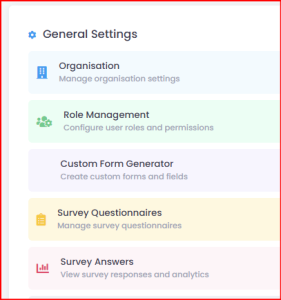
  1. Navigate to Settings > Survey Questionnaires:

2.Click to Add new Survey and create your title. (indicated by the green arrow in the image below):

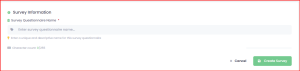
3. Give your Survey a title:
 

4.Once the title is saved, click the question mark icon to start building your questions and categories (Survey and Answers).

Answers can be determined as multiple option, text etc.
Once you are satisfied with your questionnaire, you can use the same set of options (detailed in the final image above) to send out the survey, or should you wish to amend it, the edit function is also found here.
The system is designed to be intuitive, and the best way to understand its capabilities is to have a play and see how it works.
 
If you have any questions or require support, please do reach out.
Read More Collapse